

- The hypercore row-columnar engine in TimescaleDB makes queries up to 350x faster, ingests 44% faster, and reduces storage by 90%.
- Tiered storage in Tiger Cloud seamlessly moves your data from high performance storage for frequently accessed data to low cost bottomless storage for rarely accessed data.
 This page shows you how to rapidly implement the features in Tiger Cloud that enable you to
ingest and query data faster while keeping the costs low.
This page shows you how to rapidly implement the features in Tiger Cloud that enable you to
ingest and query data faster while keeping the costs low.
Prerequisites
To follow the steps on this page:- Create a target Tiger Cloud service with time-series and analytics enabled. You need your connection details. This procedure also works for self-hostedTimescaleDB.
Optimize time-series data in hypertables with hypercore
Time-series data represents the way a system, process, or behavior changes over time. hypertable_CAPs are Postgres tables that help you improve insert and query performance by automatically partitioning your data by time. Each hypertable is made up of child tables called s. Each is assigned a range of time, and only contains data from that range. When you run a query, TimescaleDB identifies the correct and runs the query on it, instead of going through the entire table. You can also tune hypertables to increase performance even more.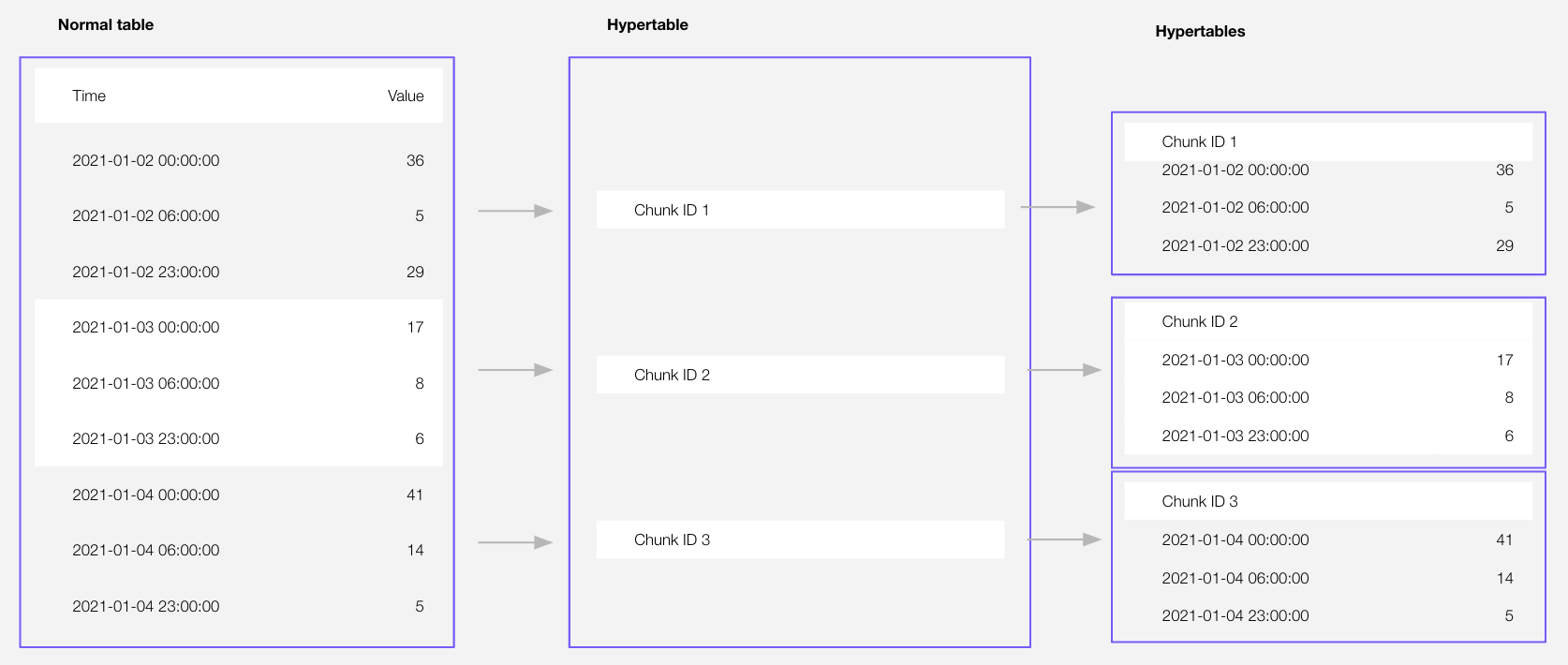 Hypercore is the hybrid row-columnar storage engine in TimescaleDB used by . Traditional
databases force a trade-off between fast inserts (row-based storage) and efficient analytics
(columnar storage). Hypercore eliminates this trade-off, allowing real-time analytics without sacrificing
transactional capabilities.
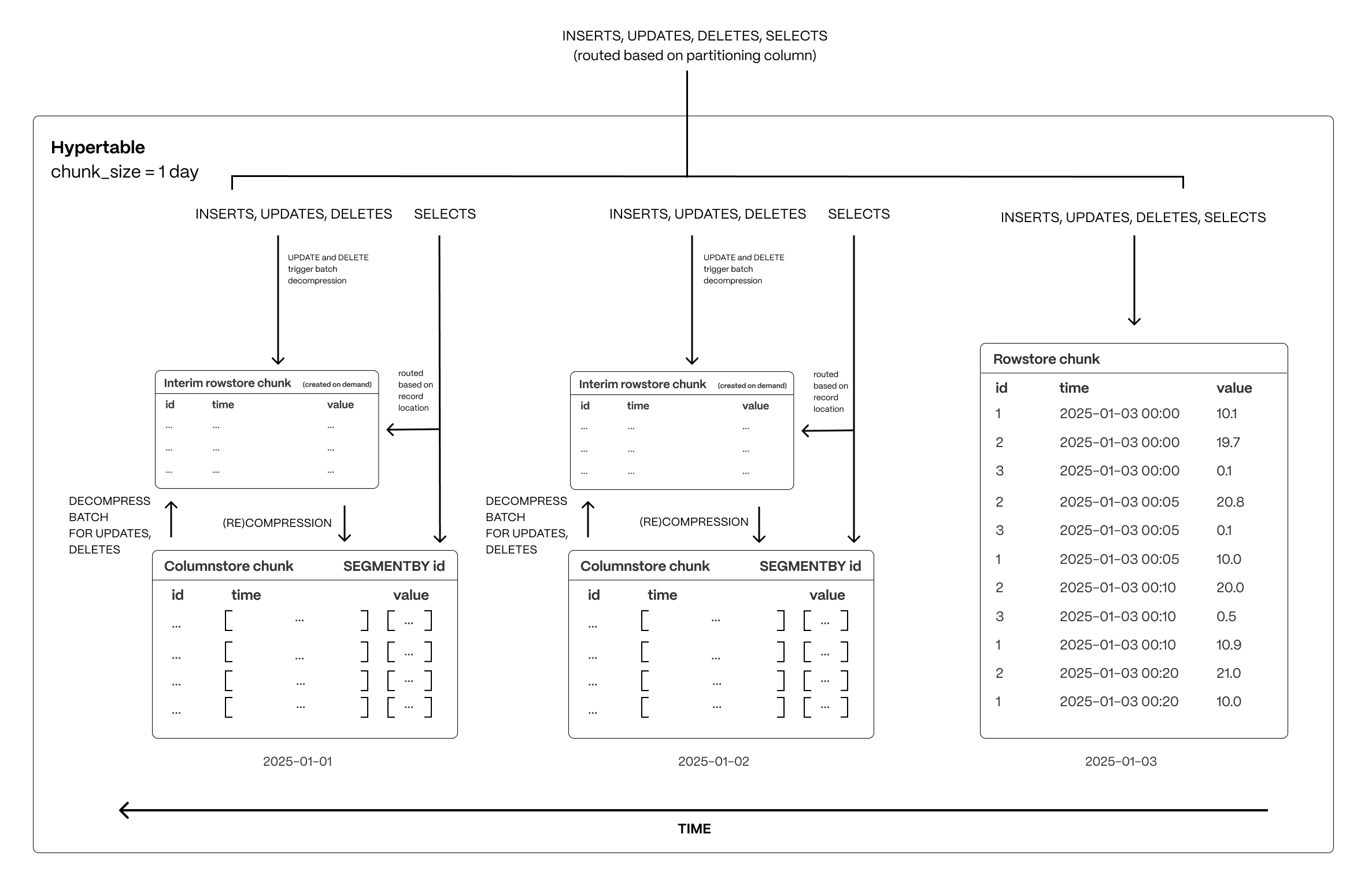
Hypercore dynamically stores data in the most efficient format for its lifecycle:
Hypercore is the hybrid row-columnar storage engine in TimescaleDB used by . Traditional
databases force a trade-off between fast inserts (row-based storage) and efficient analytics
(columnar storage). Hypercore eliminates this trade-off, allowing real-time analytics without sacrificing
transactional capabilities.
Hypercore dynamically stores data in the most efficient format for its lifecycle:
- Row-based storage for recent data: the most recent chunk (and possibly more) is always stored in the rowstore, ensuring fast inserts, updates, and low-latency single record queries. Additionally, row-based storage is used as a writethrough for inserts and updates to columnar storage.
- Columnar storage for analytical performance: chunks are automatically compressed into the columnstore, optimizing storage efficiency and accelerating analytical queries.
-
Import some time-series data into hypertables
-
Unzip crypto_sample.zip to a
<local folder>. This test dataset contains:- Second-by-second data for the most-traded crypto-assets. This time-series data is best suited for optimization in a hypertable.
- A list of asset symbols and company names. This is best suited for a regular relational table.
-
Upload data into a hypertable:
To more fully understand how to create a hypertable, how hypertables work, and how to optimize them for
performance by tuning intervals and enabling chunk skipping, see
the hypertables documentation.
- Tiger Cloud Console
- psql
The Tiger Cloud Console data upload creates hypertables and relational tables from the data you are uploading:-
In Tiger Cloud Console, select the service to add data to, then click
Actions>Upload CSV. -
Drag
<local folder>/tutorial_sample_tick.csvtoUpload .CSVand changeNew table nametocrypto_ticks. -
Enable
hypertable partitionfor thetimecolumn and clickUpload CSV. The upload wizard creates a hypertable containing the data from the CSV file. -
When the data is uploaded, close
Upload .CSV. If you want to have a quick look at your data, pressRun. -
Repeat the process with
<local folder>/tutorial_sample_assets.csvand rename tocrypto_assets. There is no time-series data in this table, so you don’t see thehypertable partitionoption.
-
Unzip crypto_sample.zip to a
-
Have a quick look at your data
You query hypertables in exactly the same way as you would a relational Postgres table.
Use one of the following SQL editors to run a query and see the data you uploaded:
- Data mode: write queries, visualize data, and share your results in Tiger Cloud Console for all your Tiger Cloud services.
- SQL editor: write, fix, and organize SQL faster and more accurately in Tiger Cloud Console for a Tiger Cloud service.
- psql: easily run queries on your Tiger Cloud services or self-hosted TimescaleDB deployment from Terminal.
Enhance query performance for analytics
hypercore_CAP is the TimescaleDB hybrid row-columnar storage engine, designed specifically for real-time analytics and powered by time-series data. The advantage of hypercore is its ability to seamlessly switch between row-oriented and column-oriented storage. This flexibility enables TimescaleDB to deliver the best of both worlds, solving the key challenges in real-time analytics.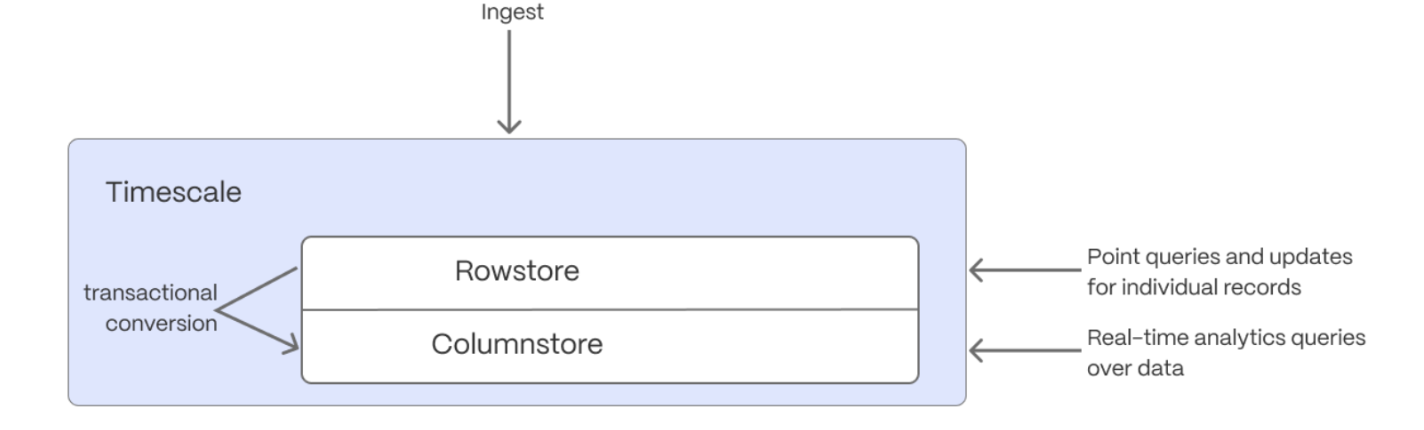 When TimescaleDB converts s from the rowstore to the columnstore, multiple records are grouped into a single row.
The columns of this row hold an array-like structure that stores all the data. Because a single row takes up less disk
space, you can reduce your size by more than 90%, and can also speed up your queries. This helps you save on storage costs,
and keeps your queries operating at lightning speed.
hypercore is enabled by default when you call CREATE TABLE. Best practice is to compress
data that is no longer needed for highest performance queries, but is still accessed regularly in the columnstore.
For example, yesterday’s market data.
When TimescaleDB converts s from the rowstore to the columnstore, multiple records are grouped into a single row.
The columns of this row hold an array-like structure that stores all the data. Because a single row takes up less disk
space, you can reduce your size by more than 90%, and can also speed up your queries. This helps you save on storage costs,
and keeps your queries operating at lightning speed.
hypercore is enabled by default when you call CREATE TABLE. Best practice is to compress
data that is no longer needed for highest performance queries, but is still accessed regularly in the columnstore.
For example, yesterday’s market data.
-
Add a policy to convert s to the columnstore at a specific time interval
For example, yesterday’s data:
If you have not configured a
segmentbycolumn, TimescaleDB chooses one for you based on the data in your hypertable. For more information on how to tune your hypertables for the best performance, see efficient queries. -
View your data space saving
When you convert data to the columnstore, as well as being optimized for analytics, it is compressed by more than
90%. This helps you save on storage costs and keeps your queries operating at lightning speed. To see the amount of space
saved, click
Explorer>public>crypto_ticks.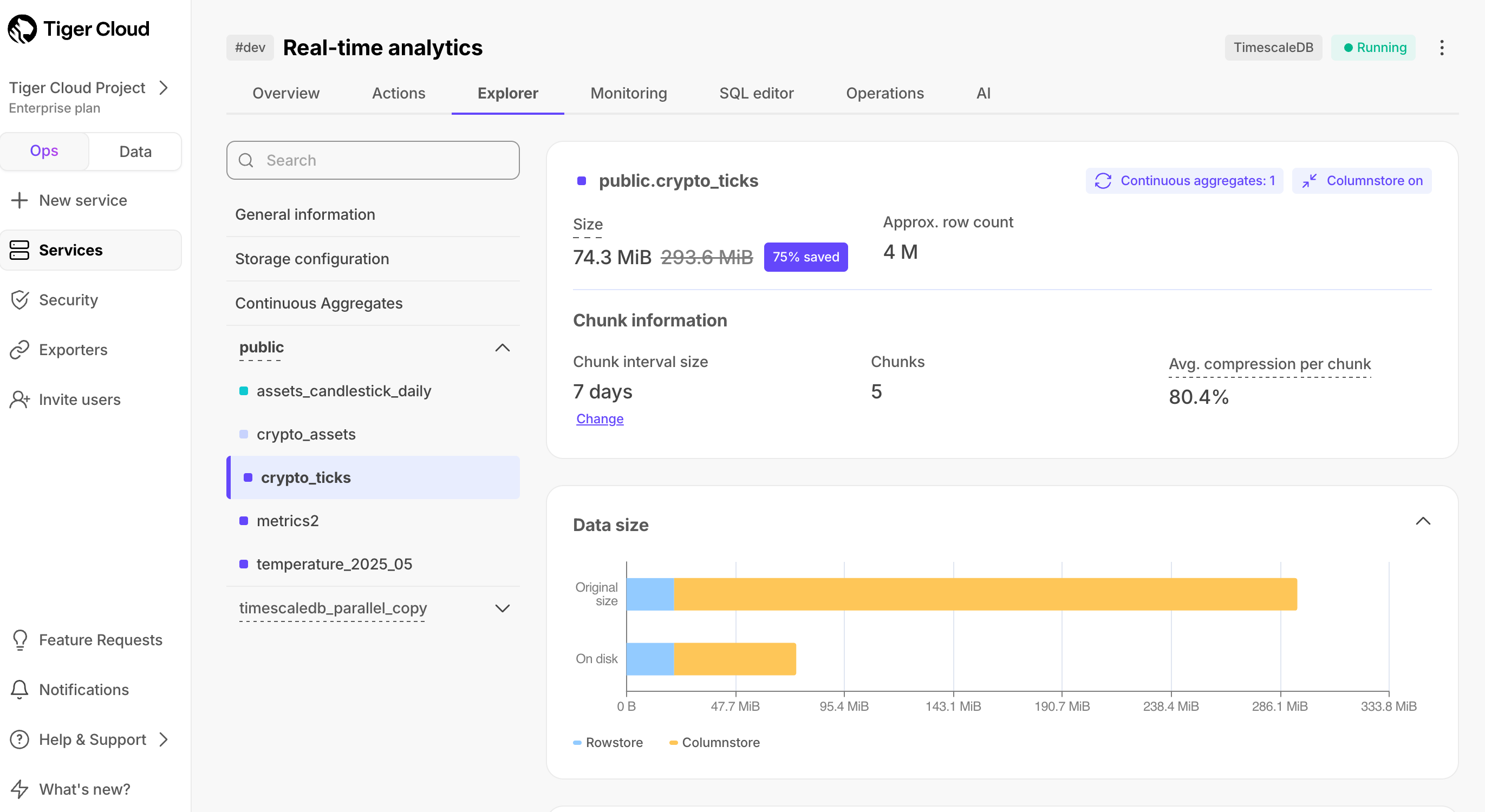
Write fast and efficient analytical queries
Aggregation is a way of combing data to get insights from it. Average, sum, and count are all examples of simple aggregates. However, with large amounts of data, aggregation slows things down, quickly. continuous aggregate_CAPs are a kind of hypertable that is refreshed automatically in the background as new data is added, or old data is modified. Changes to your dataset are tracked, and the hypertable behind the continuous aggregate is automatically updated in the background.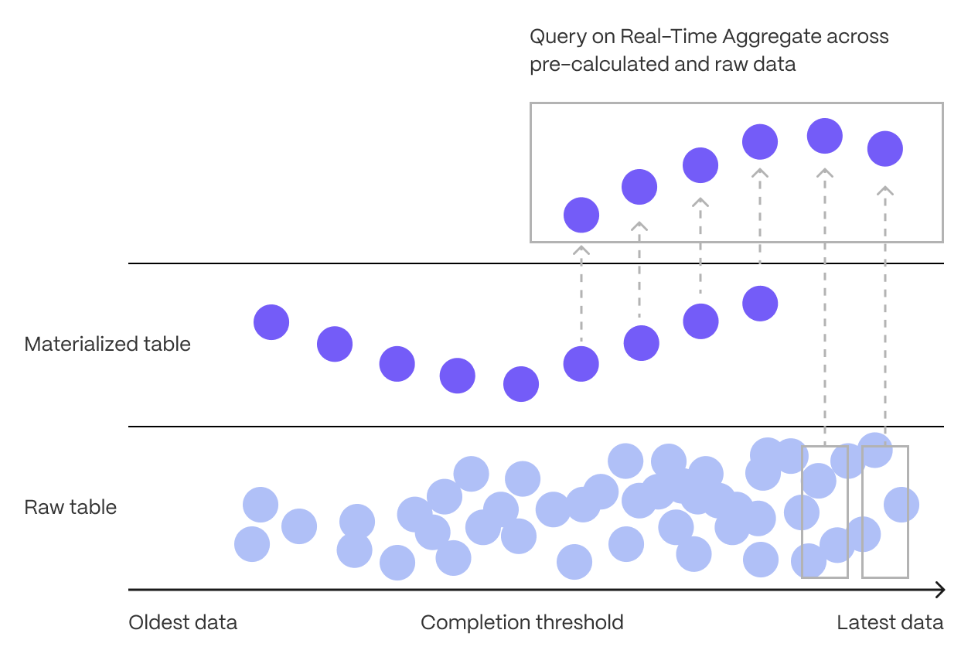 You create continuous aggregates on uncompressed data in high-performance storage. They continue to work
on data in the columnstore
and rarely accessed data in tiered storage. You can even
create continuous aggregates on top of your continuous aggregates.
You use time buckets to create a continuous aggregate. Time buckets aggregate data in hypertables by time
interval. For example, a 5-minute, 1-hour, or 3-day bucket. The data grouped in a time bucket uses a single
timestamp. continuous aggregate_CAPs minimize the number of records that you need to look up to perform your
query.
This section shows you how to run fast analytical queries using time buckets and continuous aggregate in
Tiger Cloud Console. You can also do this using psql.
You create continuous aggregates on uncompressed data in high-performance storage. They continue to work
on data in the columnstore
and rarely accessed data in tiered storage. You can even
create continuous aggregates on top of your continuous aggregates.
You use time buckets to create a continuous aggregate. Time buckets aggregate data in hypertables by time
interval. For example, a 5-minute, 1-hour, or 3-day bucket. The data grouped in a time bucket uses a single
timestamp. continuous aggregate_CAPs minimize the number of records that you need to look up to perform your
query.
This section shows you how to run fast analytical queries using time buckets and continuous aggregate in
Tiger Cloud Console. You can also do this using psql.
- Data mode
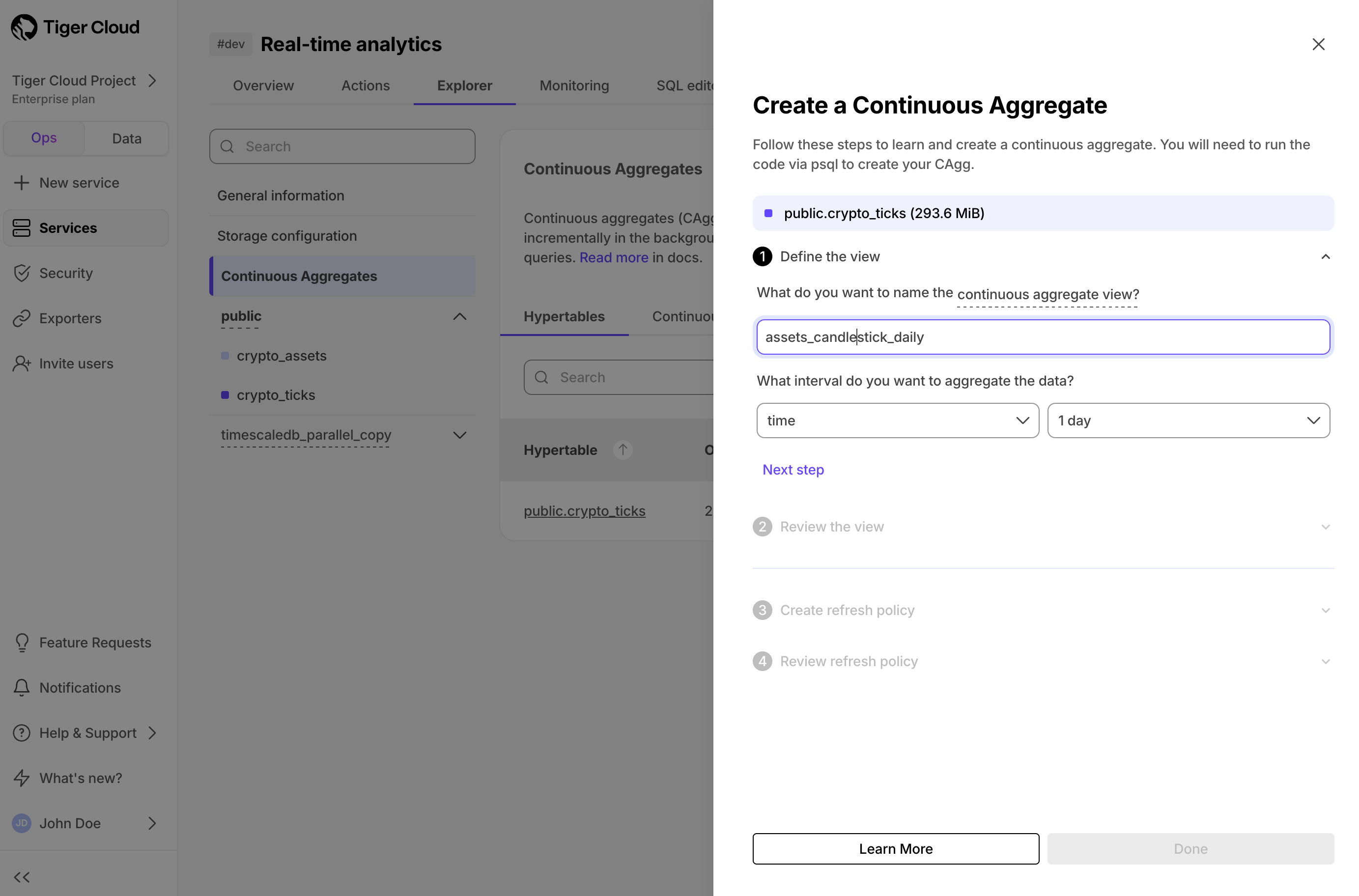
- Continuous aggregate wizard
- Connect to your service In Tiger Cloud Console, select your service in the connection drop-down in the top right.
-
Create a continuous aggregate
For a continuous aggregate, data grouped using a time bucket is stored in a
Postgres
MATERIALIZED VIEWin a hypertable.timescaledb.continuousensures that this data is always up to date. In data mode, use the following code to create a continuous aggregate on the real-time data in thecrypto_tickstable:This continuous aggregate creates the candlestick chart data you use to visualize the price change of an asset. -
Create a policy to refresh the view every hour
-
Have a quick look at your data
You query continuous aggregates exactly the same way as your other tables. To query the
assets_candlestick_dailycontinuous aggregate for all assets:
SELECT ...GROUP BY day, symbol; ) and compare the results.
Slash storage charges
In the previous sections, you used continuous aggregates to make fast analytical queries, and hypercore to reduce storage costs on frequently accessed data. To reduce storage costs even more, you create tiering policies to move rarely accessed data to the object store. The object store is low-cost bottomless data storage built on Amazon S3. However, no matter the tier, you can query your data when you need. Tiger Cloud seamlessly accesses the correct storage tier and generates the response.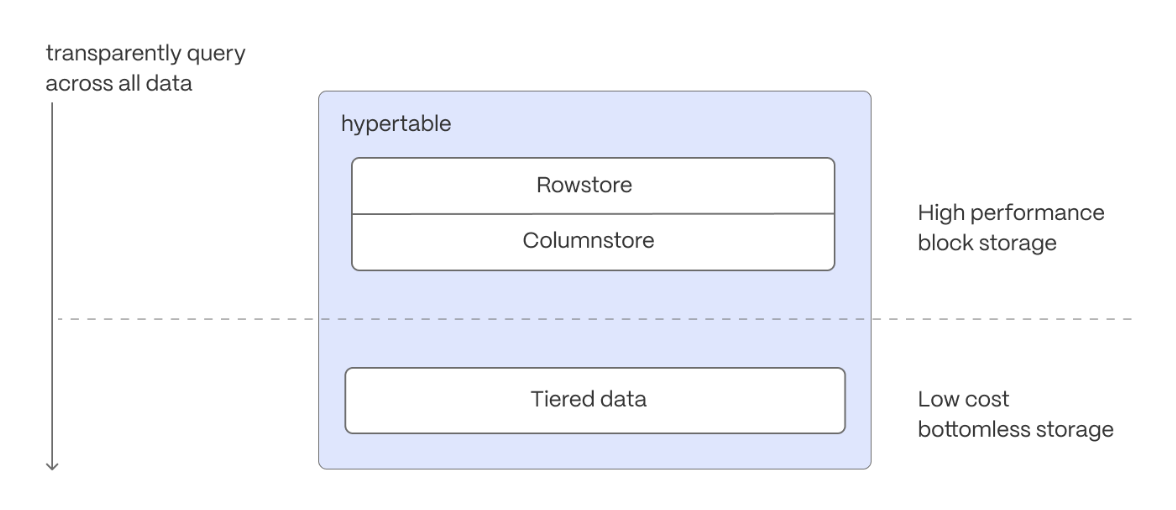 Data tiering is available in the Scale and Enterprise pricing plans for Tiger Cloud.
To set up data tiering:
Data tiering is available in the Scale and Enterprise pricing plans for Tiger Cloud.
To set up data tiering:
-
Enable data tiering
- In Tiger Cloud Console, select the service to modify.
-
In
Explorer, clickStorage configuration>Tiering storage, then clickEnable tiered storage.
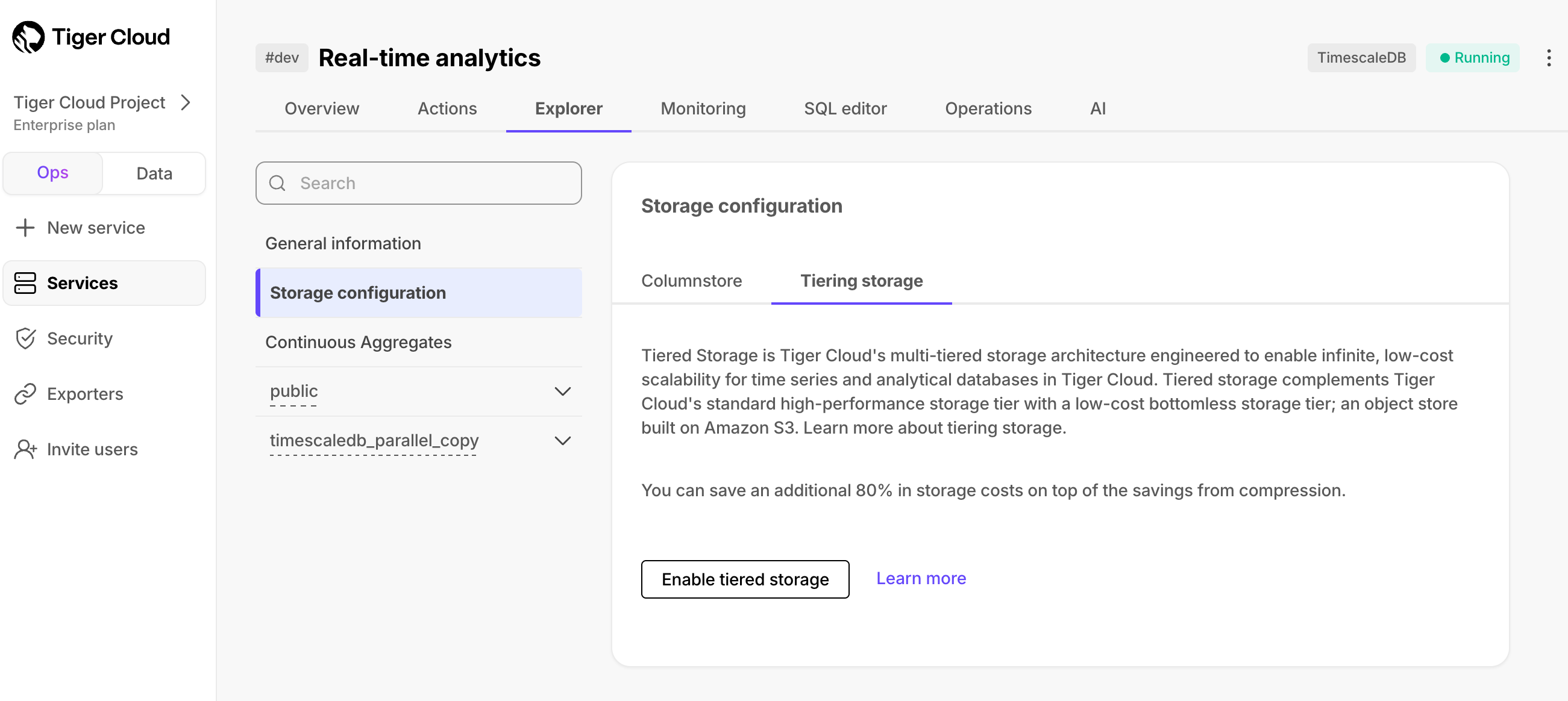 When tiered storage is enabled, you see the amount of data in the tiered object storage.
-
Set the time interval when data is tiered
In Tiger Cloud Console, click
Datato switch to the data mode, then enable data tiering on a hypertable with the following query: -
Query tiered data
You enable reads from tiered data for each query, for a session or for all future
sessions. To run a single query on tiered data:
- Enable reads on tiered data:
- Query the data:
- Disable reads on tiered data:
For more information, see Querying tiered data.
Reduce the risk of downtime and data loss
By default, all Tiger Cloud services have rapid recovery enabled. However, if your app has very low tolerance for downtime, Tiger Cloud offers high-availability replicas. HA replicas are exact, up-to-date copies of your database hosted in multiple AWS availability zones (AZ) within the same region as your primary node. HA replicas automatically take over operations if the original primary data node becomes unavailable. The primary node streams its write-ahead log (WAL) to the replicas to minimize the chances of data loss during failover. High availability is available in the Scale and Enterprise pricing plans for Tiger Cloud.- In Tiger Cloud Console, select the service to enable replication for.
-
Click
Operations, then selectHigh availability. -
Choose your replication strategy, then click
Change configuration.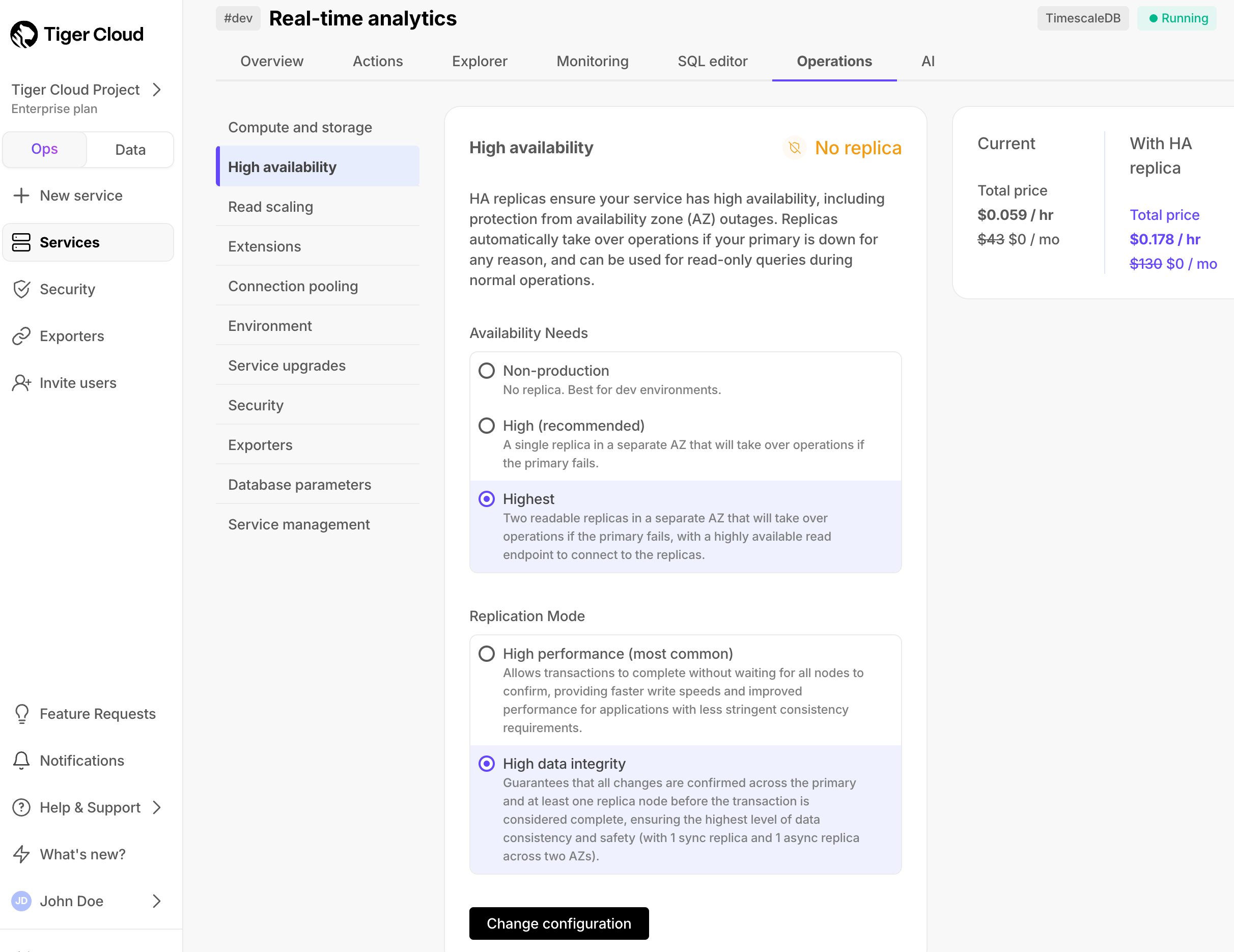
-
In
Change high availability configuration, clickChange config.